Black Friday deals I recommend


2025-11-28 09:26:54 -08:00

I know Black Friday—which these days lasts about a week, if not all of November—gets pushback for the crass commercialism of it, and I don’t disagree.

At the same time, I’m keenly aware that some folks need to save money wherever they can, and also that people who are in that position deserve nice things when they can get them.

Also, the pushback should be directed at big corporations that drive down costs by outsourcing their labor to workers in foreign countries whom they can pay pennies on the dollar, and then have to lower their prices and offer sales in order to sell anything to now-impoverished people at home. Small businesses don’t have the same culpability; they’re just trying to scrape by in a market where everybody’s belts are tightened and the big boys hold the marketing megaphones.

So, here’s my little attempt to help: A collection of Black Friday sales that I think you should check out, because I think the product is worthwhile. These are all by small businesses; some are only one or a few people, while others might be a bit larger but still aren’t humongous mega-corporations.

Nothing in this post is a paid advert. With only one exception, these are products I’ve bought before with my own money and like enough to recommend. The exception is my own cookbook, so I hope you’ll indulge me on that.

Unless otherwise noted, all of these deals are available all day today, if not longer. There are a couple that end before then!

Read the rest of this entry »

Viewing old hintbooks without a red gel viewer


2025-11-24 23:35:37 -08:00

I’ve recently been re-playing “Indiana Jones and the Last Crusade”, and it’s been long enough since the last time that I’ve needed to re-consult the hintbook a couple times.

Lemme back up.

Adventure games had hintbooks?

First, by “adventure game”, I specifically mean point-and-click graphical adventure games like “Last Crusade”.

Screenshot of the game running in ScummVM, with Indiana Jones standing in his office surrounded by clutter. A table of verbs are arrayed beneath the scene.
Hi, I’m Indiana Jones. Welcome to my game.

Early adventure games had a raft of verbs for specifying what you wanted your character to do—early Lucasfilm/LucasArts games like “Last Crusade” had over a dozen, and early Sierra games had command-line input with too many verbs to list. As the form matured, games dispensed with the specific verbs in favor of contextual “use” and “examine” actions on the left and right mouse button, respectively, but the essence remains the same: exploration and puzzle-solving to progress a narrative.

And some of those puzzles could be tricky, so one thing that publishers like LucasArts either included in the box or sold as an add-on was hintbooks.

A photo stolen from eBay of a complete “Indiana Jones and the Last Crusade” package, including the box, floppy disks, manual, hint book, translation table (for copy protection), and the red gel viewer you'd need for both the hintbook and the translation table.
Photo “borrowed” in true adventure-game-protagonist style from this eBay listing. All this can be yours for only $385!

Typically, a hintbook included a series of questions you might ask, like “how do I get ye flask”, with one or more hints after each question, each one more spoilery than the last, and each one veiled in some way so you could get a little closer to figuring out the solution without having it just dropped on you right away.

How hintbooks worked

The exact mechanism varied. Infocom was famous for their “InvisiClues” which involved disappearing ink that reappeared with a special marker pen. But Lucasfilm/LucasArts—and one or two other publishers, including Sierra—used a different system involving a red gel viewer.

“Gel” in this case is the photographic term: a sheet of translucent plastic that filters out all colors except one. A red gel passes red light but blocks all other colors. If you’ve ever seen a pair of red-and-blue 3D glasses, those are red and blue gels—and, in fact, you could use the red side of such glasses if you lost the viewer that came with the hintbook.

The text in the books was printed in color. Question headings and the actual hints were printed in cyan, but the veil over the hints was made of red text, or a noise pattern in red and orange.

A page from the hintbook for “Indiana Jones and the Last Crusade”, with questions in cyan and answers also in cyan but covered with “Indiana Jones and the Last Crusade” repeated over and over in red.

Color wheel with red and cyan highlighted, which are directly across the wheel from each other.
When you applied the red gel, the red veil and the white paper appeared to be the same color, while the cyan text—reflecting nearly no light that could pass through the red gel—appeared dark, or at least darker. (The contrast wasn’t great.)

This worked well enough… as long as you had a red gel viewer to enable you to read the text. If you lost it, and didn’t have the viewer from a different game or a pair of 3D glasses, you were kind of stuck.

Viewing preserved hintbooks

Many if not all of these hintbooks have been preserved online, thanks to tenacious collectors, but reading them can be a challenge. Some of have had the hints unveiled for you, which is for the best for the invisible-ink ones (and I’m sure was no small feat).

For red-gel hintbooks, it actually is possible to replicate the red gel viewer in software, given sufficiently high-quality scans of the pages.

I use Affinity Photo (a pre-Canva version). You could use Photoshop or maybe even Acorn.

At minimum, you need a Color Matrix* filter (called something else in some apps—Affinity Photo calls it Channel Mixer) and something that can convert the fairly murky result of that into a more-readable black-and-white, such as a Threshold filter. Ideally, you could mask these filters to a particular shape; Affinity has this ability (you can put the filters in a group, with the scanned page outside of and below the group, and apply a rectangular mask to the group).

For the “Last Crusade” hintbook, I had success with red=red × 100%, green=red × 100% + green × 100%, blue=red × 100%, and a threshold of 92%. No need to mess with the alpha.

With a document so constructed, you can drop in a scanned page, layer it underneath the group, and then drag the mask shape around to use as your “viewer”.

Screenshot of the Affinity document in question, with the mask rectangle positioned to reveal a hint that says “Now you have to push a statute to get it to turn.”

Now you can read those hintbooks just like in the 1990s, except you’ll never have to worry about losing the hintbook viewer gizmo again.

Indiana Jones standing outside of Brunwald Castle, which has Nazi flags hanging from its exterior walls.
I’m here to chew bubblegum and punch Nazis. And I’m all out of bubblegum.

The tricky bit: Getting usable scans

I was going to include a list of links to hintbooks you can try this with, but apparently I got lucky with the Indiana Jones and the Last Crusade hintbook being a usable scan. The others I looked at all have the colors messed with (probably on some blanket preset that makes sense for B&W documents) in such a way that the trick no longer works.

Please, if you scan in a hintbook that requires a red gel viewer, publish the scans without color-correction.

Apparently, later LucasArts games—including the other Indy adventure, “Fate of Atlantis”—ditched the red gel trick entirely in their hintbooks, and those are of course perfectly readable today.

Bonus link

While looking for a photo of the sort of viewer I’m talking about, I came across this tutorial for making your own red gel viewer. I haven’t tried it, but if you really want to do things the old-school way, and don’t want to try your luck finding a vintage one on eBay, that might be an option.


* I’ve written about Color Matrix before.

Fixing my foaming soap dispenser


2025-10-12 20:36:26 -08:00

Mostly I wash my dishes in my dishwasher, but when I hand-wash the things that need hand-washing, I use a foaming soap dispenser.

The contents of a foaming soap dispenser are watered down relative to “regular” soap. When the manufacturer does it, this is a ripoff (you’re paying them for water replacing 80% of the soap), but when you’re the one doing the watering-down, it becomes a tremendous cost advantage. I save so much money on hand-wash dish detergent, because I barely use any of it; I buy a new bottle every few years. I don’t even buy the big jugs like I used to.

To make your own foaming soap refill with dish soap, add four parts water to one part dish soap (e.g., 240 ml water + 60 ml soap), pour that into an empty foaming soap dispenser, and mix. (Some soaps might require a different ratio.) I use this soap in this dispenser that screws onto a mason jar.

My hand holding a mason jar serving as a foaming soap dispenser, filled with diluted hand-wash dish soap.
If I were buying the jar today, I’d get a plain-looking one from Dollar Tree or Daiso.


Recently, my dispenser stopped dispensing. It wasn’t stuck, which is a common failure mode for this type of soap dispenser (the pump gets stuck down and doesn’t pop back up); in this case, I could still pump it like normal, but all it did was squirt air into the jar rather than squirt foamy soap onto my hand/sponge/thing-that-needed-cleaning. Or if I did get any soap foam, it was an unusably-small amount, probably back-fed from the foam that accumulated in the jar as the pump squirted more and more air through the jarful of diluted soap.

I fixed it by filling a bowl with warm water, dipping the whole upper half (but most especially the hole where the foam is supposed to come out) upside-down in the water, and pointing the dip tube away from me, then pumping away until the dip tube started shooting squirts of plain water.

Basically, if your pump gets into a state where it only pumps air backward into the jar, lean into that and pump water backward through it instead. That should rinse out whatever dried soap (I guess) is fouling the mechanism.

Once I did that, I was able to put the pump back on the jar, then do a few more pumps to re-prime it with soapy water, and now it gives the same excellent foam it used to.

Let the user help solve their own problem


2025-01-14 13:46:36 -08:00

I wish we had a maps app like Apple Maps or Google Maps that let you order up a travel itinerary using public transit between two points, and explicitly pick the transit routes involved. Or, ideally, multiple sets of routes, for comparison.

Map of San Francisco showing BART as a rainbow through the Mission before turning right to follow Market toward the Bay. Along the latter section, one block from Powell Station, a point of interest is marked for the Metreon shopping center.

Like, let’s say I’m in the Mission and I wanna get to the Metreon. One of the existing apps might suggest the 14R rapid bus, which arrives in X minutes and takes Y minutes, or BART, which arrives in Z minutes and takes W minutes. But it might leave out alternatives like taking the 49 bus to Van Ness Station and then taking the Muni subway from there.

Sometimes all the app’s recommendations are reasonable, but sometimes there’s one or more options that might be preferable—and I don’t know how preferable if the app isn’t showing me when the next 49 arrives, so I can compare to the 7 minutes for a 14R or 9 minutes (including a short walk) for BART.

What I want is the ability to add a specific set of routes to include in consideration, or even to force an itinerary using those routes. Let me say “49, KLMN” and have it include that series of routes among my options for comparison.


This is one instance of a general problem, which is products having only algorithmic solutions to the user’s needs, with no opportunity for the user to contribute to the solution.

The algorithmic-only model admits only one remedy: Improve the algorithm. But because no algorithm will ever be perfect, you’ll be playing this game of whac-a-mole forever.

This goes for the developer of each product, as well as for the user. I could try the same query in Apple Maps and Google Maps and the Transit app and whatever else, but as long as they all work this way, all I’m doing is holding up different slices of Swiss cheese next to each other and comparing their holes.

When the user can contribute to the solution, then there’s a chance that they’ll have a better idea of how to meet their own needs.

And these aren’t mutually exclusive. You could use the user’s input to improve the algorithm’s suggestions.

Email spam filters have had this for decades. The “Report Spam” and “Not Spam” buttons help train the filter. And we still have them because the filter will never be perfect (not just because spam is always evolving).

For the transit routing example, it’s a more complex problem (not a simple ham-or-spam dichotomy) and there are privacy considerations. Even so, helping improve the routing algorithm for everyone could be something people could opt into.

If they decline, maybe the algorithm could use training supplements kept locally. The user who provided a suggestion could still benefit, even if they’ve declined to share that (potentially personal/identifying) data with others.

And even just the ability to add a route combination to the list, even if I have to do it every time, would be an improvement over not having that and being limited to whatever options the algorithm picks for me.

Don’t assume your algorithm has to solve everything all on its own. Let the user help. They’ll be happier with a solution they helped create, partly because it may be better for their specific needs, and partly because they got to be involved.

Stuff I made this year


2024-12-29 21:29:44 -08:00

It’s been a hell of a year, but it’s almost over.

Since social media has gotten a lot more fragmented since Twitter died, probably a lot of folks haven’t seen the stuff I’ve only posted on my Mastodon or on my Cohost page (RIP).

So here’s a round-up of most of what I made this year. I’ll likely import select posts from my Cohost archive (download yours today!—seriously, the site’s getting deleted in a couple days!) at some future time, but for now, they’ll stay on Cohost (and the Internet Archive’s mirror thereof).

If you’re wondering why March is so heavy in this list, it’s because of #MARCHintosh. Which is coming up again soon!

Sodium content in lemon-pepper seasonings


2024-11-12 06:03:27 -08:00

While I was writing the previous post about sodium in frozen chicken, it occurred to me that I should also include info on sodium in the lemon-pepper seasoning I often add to it, and eventually I decided to split that off into its own post.

I have high blood pressure. Have had for years. I take medication, but I’m also trying to reduce the sodium in my diet to limit how much it contributes.

It turns out that lemon-pepper seasonings, which I use frequently, are a significant contributor of sodium, as they all include salt (presumably sodium chloride) as one of their top two ingredients. Sigh.

There are salt-free options and I’m going to have to try some of them at some point. In the meantime, here are the sodium contents of all of the lemon-pepper seasoning products listed on Safeway’s website (minus the explicitly salt-free ones), plus the one currently in my kitchen, along with where “salt” is listed in the ingredients list.

These are all based on 1/4 teaspoon of seasoning, which ranges from 0.7 to 1 gram depending on brand. Most of these have either salt or pepper as the first ingredient; I’ve noted the exceptions.

Brand Sodium content Salt is listed…
Lawry’s
The one I was using before my current jar
90 mg 2nd
Pacific Organic
The one I’m currently using
140 mg 1st
Sunny Select (Save Mart) 140 mg 1st
Signature Select (Safeway) 95 mg 2nd
Kinder’s 105 mg 2nd (sugar is 1st, pepper 3rd)
McCormick 180 mg 1st
Scott’s 210 mg 1st (“spices” is 4th)

Sodium content in frozen chicken tenderloins


2024-11-12 06:02:38 -08:00

[Content note: This post is about meat used in cooking. If you don’t eat meat, this will be at best academic. If you’re opposed to the eating of meat, feel free to skip this post entirely.]

I have high blood pressure. Have had for years. I take medication, but I’m also trying to reduce the sodium in my diet to limit how much it contributes.

I also do a lot of home cooking, and many of my dinners involve a frozen chicken breast tenderloin. For one person, namely me, this is the perfect serving size of meat protein. Generally I grill it on my George Foreman grill with a dusting of lemon-pepper seasoning.

Frozen chicken typically has some sort of brine solution added to it. I assume this helps the freezing process, or something. One consequence of this is that the sodium content of frozen chicken is greater than refrigerated chicken (which might be a reason for me to switch to refrigerated… hmmm) and also varies widely between brands.

I’m only going to be looking at tenderloins, since that’s what I buy. I’d guess that the ratios would be similar for a different cut—but if you buy a different cut and you care about sodium content, you should probably research the sodium content of your options for that cut yourself.

For most of these, I’ll link to the product online. One of them I don’t have an online product link for; the other, I’ll elaborate on after the table.

All of these are based on the nutrition facts label, which all of them give in terms of one 112-gram (4-ounce) tenderloin.

Brand Sodium content
Signature Farms (Safeway) 190 mg
Trader Joe’s 75 mg
Foster Farms 300 mg
Note: Their website says 280 mg but I’m going by a bag I own.
Kirkland Signature 200 mg
Good & Gather (Target) 280 mg
Tyson 190 mg
Kroger 180 mg
Great Value (Walmart) 190 mg
Perdue 260 mg

The least was Trader Joe’s at 75 mg, and the greatest was Foster Farms at 300 mg (with Target just behind it at 280). Quite a range!

One thing I noticed is that nutrition facts published online may disagree with what’s printed on the bag. One example is noted above; another, bigger discrepancy is Safeway’s listing for store-brand frozen chicken tenderloins, which says that those contain 1,090 milligrams of sodium—five times the sodium content listed on the (differently-styled) Safeway-brand bag in my freezer now. That seems like it might be the wrong product’s nutrition facts.

Skillet handle holder


2024-10-27 12:06:43 -08:00

I cook with a couple of cast iron skillets—a 6-inch one and a 10-inch one—and, after each cooking session is complete, I wash the skillet so the fats and food bits left behind don’t set. In order to do this, I need to hold onto the handle—but by that point, the handle is very hot. Even with cast iron’s notoriously slow internal distribution of heat, the handle will still be 200°F or more.

My kitchen towel is often wet from hand-washing by that point, so I can’t very well use that as an insulator—the water will conduct the heat very efficiently. And I’m not stocking the kitchen with half a dozen towels at a time.

Pot-holders work, but it’s easy for a pot-holder to get misaligned and me to end up touching hot metal anyway. What I need is something I can slip onto the handle for that final cleaning step.

I’ve been using the Ove Glove, but wanted something easier to wash.*

Lodge sells silicone pot handle covers, but I’d rather not spend $10 a pop for more plastic.

What I realized is that I can modify a pot-holder by folding it over and sewing it closed. So I bought a two-pack of black all-cotton pot-holders from Dollar Tree and got started.

An unmodified black square pot-holder, with a loop for hanging at the middle of one edge, and a care label sewn in at the middle of another edge.

The first step was to seam-rip all of the original bias tape away from the edge, exposing the edges of the pot-holder body. This binding also includes the loop that can be used to hang the pot-holder, and secures the label with the care instructions. I want to keep both of these in the new design.

I cut the original bias tape (from the end opposite the loop) to a length that I could put back on one edge, including both adjacent corners. This edge becomes the perimeter of the opening.

The pot-holder with its original bias tape removed, exposing the edge of the cotton batting inside. A length of the original bias tape has been clipped back onto one edge of the pot-holder, while another length of the bias tape lay alongside to show its one-inch width.

Then I made some fresh bias tape from black cotton quilting fabric. I measured the length around one and a half sides of the pot-holder, which is the length of binding that will run from the open end down one side and along the closed end. The width is three inches, producing 1½-inch (36 mm) bias tape.

I don’t have a bias tape maker in that width (my widest one is 24 mm), so I had to apply the folds manually using pins and my ironing board. All-metal tailoring pins are helpful here because you can iron directly over them.

The inch-and-a-half black bias tape. One end of it is shown here against a small green cutting mat.
I cut off the diagonal ends to leave a right-angle end before sewing.

The reason for the jumbo bias tape is that twice the thickness of the pot-holder is _thick_. I used a 100-diameter denim needle and reduced my presser foot pressure by two full turns, and my Singer Heavy Duty machine still struggled at times. And you can really tell where the cotton batting is being compressed by the lockstitch.

I decided to put the care label at the closed end. One thing I’d do differently: I think I’d prefer the label on the underside. The side I put the label on ends up facing up and tickling my palm when I’m holding the skillet with my left hand.

The loop also goes at the closed end, at the very end of the new bias tape. I cut it off from the original bias tape and stuck one end in under the new bias tape on each side.

The finished holder, shot at an oblique angle to show the opening in the foreground. At the far end is the care label and the loop.

The finished product is very much a universal skillet handle holder, longer than either of my skillets’ handles; theoretically I could have trimmed it down to fit one of my skillets more exactly, and done the same with the other pot-holder to make one tailored for the other skillet. But I’m happy with this for now.

Holding my ten-inch skillet by the handle, which is encased in the cotton holder.

* I had misremembered the Ove Glove as not being machine-washable, but I just looked up the care instructions and it is. Then I checked on the care label for the pot-holders and apparently those, despite being all-cotton, are “hand wash only”. Oops. (Neither can be tumble-dried.) When the time comes, I’ll probably machine-wash the pot-holder handle holder anyway and see what happens.

I upgraded my iBook G4 to have an SSD


2024-03-31 14:32:35 -08:00

I did take some notes which I’ll present below, but this isn’t a full how-to. I used iFixIt’s guide plus occasional reference to the official Apple Service Source repair guide (those are not strictly public but can be had from your favorite abandonware site).

For this year’s #MARCHintosh, I decided to replace my iBook G4’s 30 GB spinning-rust hard drive with an SSD.

The #Marchintosh logo, depicting a smiling compact Mac icon with a four-leaf clover and a stripe of six-color Apple rainbow.

This was my second SSD upgrade, as I’d previously replaced my G4 Cube’s hard drive with an SSD. (The pictures on that page show a hard drive because, before the SSD upgrade, I’d replaced the Cube’s hard drive with another hard drive, and that was what I originally documented on that page. Then, after that, when I decided to upgrade to an SSD, I used my own tutorial. iFixIt didn’t exist yet.)

I rather despise working on laptops, though this wasn’t as bad as I’d worried it would be. (Upgrading the memory in my Mac mini was harder. I pointedly did that as soon as the machine arrived so that it would be done and I’d never need to open the machine back up for the rest of its life.)

The thing that motivated me to go forward with it was that the iBook was absolutely filthy. It had been Mom’s, and she was a smoker in her life; she would routinely be smoking a cigarette and working on the computer, and getting so absorbed in the latter that ash would fall from her cigarette onto and into the computer. So I resolved to clean the disassembled parts as well as upgrade the storage.

For the cleaning, I mostly used paper towels wetted with diluted all-purpose cleaner. A couple small spots of deposited nail polish were resolved with cotton pads soaked with nail polish remover. It worked fine, at least so far—if I’ve started some chemical process of plastic deterioration, I don’t know it yet.

The iBook in question, closed, and visibly dirty even on the outside.
Before cleaning.

The iBook in question, closed, now thoroughly cleaned and spiffy.
After cleaning.

Once I decided the project was go, I also added in a memory upgrade, because it was less than $20 and I was already buying stuff from OWC for the operation anyway. The machine had 512 MB of RAM; now it has 1 GB. (Plus the 128 MB on the logic board.)

One key difference from the Cube upgrade: The iBook, being a laptop, doesn’t have as much space for the upgraded drive. The Cube had some wiggle room taken up by brackets; the iBook has basically none. In the Cube, I installed a standard-size SATA SSD plus a SATA-to-PATA adapter; in the iBook, that wouldn’t have fit.

So my first thought was an M.2 SSD, that being the form factor that today’s computers generally use. I ran into a problem: There are like three different signaling protocols that all run over the M.2 form factor, and M.2 correspondingly has three different keying combinations to guard against protocol mismatches (an incompatible SSD won’t physically fit, though an SSD that fits isn’t necessarily compatible). I noped out of trying to sort that out.

What I went with instead was mSATA. This form factor is kind of dying off as M.2 takes over, but Kingston still sells mSATA SSDs directly from their own website, and I found a suitable adapter on Amazon. (I buy from alternatives like Micro Center or direct from manufacturers whenever possible, but it wasn’t in this case. The manufacturer’s website links to their Amazon store.)

The two-and-a-half-inch spinning-rust hard drive, and the mSATA SSD in its IDE adapter, side by side in my hand.
The old spinning-rust drive is 30 GB; the new SSD is 256 GB.

Read the rest of this entry »

High-resolution Creative Commons badge


2023-10-26 19:45:07 -08:00

I noticed that the pointers tutorial‘s Creative Commons badge had gone missing. I guess they got tired of people hotlinking it.

So I grabbed it from the Wayback Machine, and when I did, I noticed that it’s in the classic 88×31 format used by so many miniature promotional images. If the phrase “Netscape Now!” means anything to you, you know what I’m talking about.

There’s been a growing trend of making new 88×31 images, some in higher resolutions for modern hi-DPI displays. So I thought I’d do one: redrawing the classic Creative Commons bug as a vector image that could be exported as SVG and as high-res PNG.

Here you go:

The Creative Commons logo on a gray field, with “Some Rights Reserved” in white on black beneath it.
The double-resolution PNG.
The Creative Commons logo on a gray field, with “Some Rights Reserved” in white on black beneath it.
The SVG.

I think the original image falls under the CC-BY (Attribution) 2.0 license that was then current. I’m happy to place these new images under the same license or the newer 4.0 version.

The third option: Novavax’s covid vaccine


2023-10-24 19:06:23 -08:00

I’ve had four mRNA-based covid shots so far: Pfizer, Pfizer, Moderna, Pfizer.

They’re great protection, of course, but I get harsh side effects from them—two or three days of alternating fever and chills. Not fun. Some folks take ’em just fine, and if you’ve never had an mRNA-based vaccine, I’d encourage you to try it at least once—my experience isn’t universal. But I always have a rough time.

I wanted to get this year’s covid shot back in September, which was the anniversary of my previous one, but I had to wait for availability to settle a bit since shots were hard to come by for several weeks, and I know folks who had appointments and then found out they’d been canceled on the day of due to shortage.

The longer that went on, the more I wanted to get my shot ASAP since we’ve already been in a covid surge for months by this point (per wastewater data) and we aren’t even to the holiday season yet.

Screenshot of Biobot's nationwide covid prevalence estimates for the past six months. It starts ramping up in July and has been fairly steady at high levels for the past two months. It's dipped a little bit this month but it's not down to anywhere near pre-July levels.
Pictured here: Everyone I know, and everyone they know, who’s been coming down with covid over the last few months.

Then I heard that Costco has Novavax. (I later found out that Rite Aid also carries it. CVS might have it but apparently you can’t just book it through the website, you have to ask—weird.)

I went on Costco’s website (which offers both Moderna and Novavax), made an appointment for what is now this past Saturday, and stocked up on my usual post-vax supplies: Gatorade, water in the fridge, clean laundry, and a few low-effort meals and snacks.

Saturday, I got the shot. No difficulty, and my insurance covered the cost—I paid $0.00.

Sunday, I spent the entire day feeling like I had a mild cold. No fever, no chills, just lots and lots of sleeping. Drank lots of water, some Gatorade, and even ate on my usual schedule.

Monday… I was fine. By Tuesday, I was back to 100%.

I spent one whole day with the symptoms of a mild cold.

This is a night and day difference from my experience with the Pfizer and Moderna vaccines. It’s more like my experience with a flu shot: sleep like a cat in a sunbeam for a day, then right back to normal.

The efficacy of Novavax is comparable to the mRNA vaccines—it might be a little lower, but close enough that the difference in post-vax experience makes it well worth the tradeoff. Doubly so if you’ve already had, or might get next time, an mRNA-based shot and want that “all of the above” protection.

If you also have a rough time with mRNA-based vaccines, try Novavax.

If you don’t have RSI, ergonomics are for you


2023-09-29 21:56:20 -08:00

This was originally posted as a tweet thread back in February 2022. For this Director’s Cut Extended Remix, I’ve added the photos and applied styling.

I used my laptop as a laptop for about an hour yesterday and my wrists still hurt. It’s fading but slowly.

So I guess I don’t get to do that anymore. Split keyboard+vertical mouse or nothing.

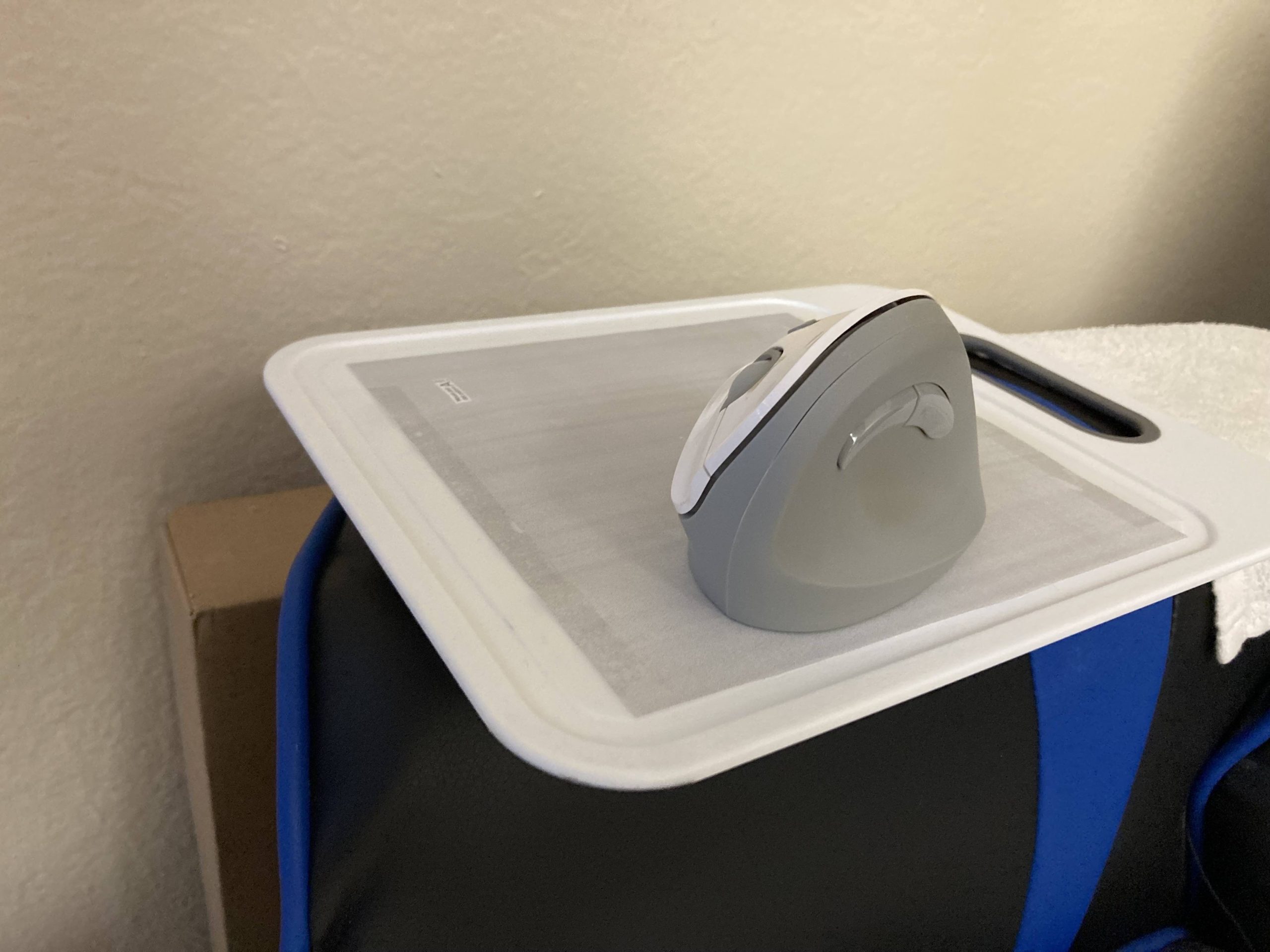
My Matias Ergo Pro two-piece keyboard, splayed out on a lap desk sitting on my chair.My Kensington Pro Fit Ergo Vertical Wireless mouse, on a printed mousepad background on a cutting board on the (mostly flat) arm of my chair.
2023 note: I’ve since replaced this keyboard with an ErgoDox EZ.

Maybe a split keyboard and vertical mouse seem like luxuries, because that’s their market position (the high end), but I promise you there’s nothing luxurious about this.

Really it’s more that there are keyboards and pointing devices that hurt people, and those that don’t.

But I use a one-piece keyboard and a regular mouse/trackball/trackpad and I’m fine!

Well, maybe. Or you’re not injured yet. Or not enough yet to notice without trying ergonomic hardware for a week and gauging the difference.

Ergo hardware can help you stay uninjured.

I cannot emphasize enough how important prevention is. How important it is to protect your hands before they’re injured.

You can’t un-injure them. You can only avoid injury… or not.

The trillion-dollar coin is an idea for one way that Democrats could get around Republican threats to throw the United States into default. (There are other options, including standing on the 14th Amendment clause that says “the public debt… shall not be questioned”.)

The basic idea is this: The Department of the Treasury has the authority to direct the US Mint to produce a platinum coin at any denomination they see fit. The value of such a coin is its face value—that is to say, whatever it says it is. So when the Republicans start throwing around threats like “you need to cut off services to these groups of people or else the government is going to run out of money!!!”, as they have been, one option is to simply literally make more money—in enough of a quantity that it will pay for all the US Government’s expenditures for the next year or so and take a lot of the hostage-takers’ leverage away.

I’m not qualified to debate the policy or economics of it, and most likely, neither are you. But what I can do is think of any number of ways that someone—intentionally or otherwise—could fuck it up.

Mis-striking the coin

The last step of the process of producing a coin is called “striking” it. That’s the part where the design gets pressed into the faces of the (hitherto) blank.

Normally coin production is a mass-production process; the country’s mints produce up to tens of thousands of coins per minute. In this case, we’re talking about a one-off, so I don’t know whether they’d do the process differently or just run the machine for a very, very short amount of time.

Either way, it’s certainly possible for the coin to be mis-struck, or otherwise produced in a way that it is obviously defective. This has happened in a variety of ways to nearly every type of coin, and normally, mis-struck or otherwise defective coins are worth significantly more than face value.

What does that look like when the face value is $1,000,000,000,000?

Most likely, the mis-struck coin wouldn’t stay that way—they’d melt it down and try again. (After all, platinum ain’t cheap.) We might never know that there was a mis-struck trillion-dollar coin in existence for some short amount of time.

Composition

The specific section of the US Code that authorizes this stunt says:

The Secretary [of the Treasury] may mint and issue platinum bullion coins and proof platinum coins in accordance with such specifications, designs, varieties, quantities, denominations, and inscriptions as the Secretary, in the Secretary’s discretion, may prescribe from time to time.

The trillion-dollar coin wouldn’t be a bullion coin, which is a coin defined by its amount of some precious metal—that would be a “this much platinum” coin, not a coin with a dollar denomination. So the trillion-dollar coin would be a proof coin.

The Mint regularly issues platinum proof coins, such as this coin for this year. That coin contains 1 ounce of platinum, and has a face value of $100, but is sold at a price dependent on the value of its platinum content, which is somewhere between $1,000 and $2,000—ten to twenty times its face value.

So, for a trillion-dollar coin, how much platinum would they need? Does there need to be a particular ratio, or could they make a zinc coaster with 1 oz of platinum mixed in?

Or does it even matter? Could they make a 1-oz platinum coin, not much different from the ones they’re already making, and just add ten more zeroes across the back of it?

Speaking of which…

The design

There’s at least one artistic rendering of what such a coin could look like, but it’s just one artist’s conception and not an official rendering from the US Mint.

Presumably they’re not going to just type in “ONE TRILLION DOLLARS” in Impact and call it good. This is The Coin! It’s got to look like something.

On the flip side, this whole idea is an emergency measure. They’re not going to have time to go through the usual processes for coming up with new coin designs—not when the US Government could reach the statutory debt limit in… not even a couple of weeks at this point.

Hopefully they’re coming up with a design now that they can have ready to go if and when it’s needed. (And make absolutely sure it has no typos in it.)

Of course, having the design ready to use at a moment’s notice gets into issues of…

Operational security

It’s easy to say “the Mint should do this” or “Treasury should do that” but it’s worth remembering that these are granfalloons, in the sense in which Don Lancaster used the term (slightly different from Kurt Vonnegut’s original meaning):

tactics secret—beware the granfalloon, my son

A granfalloon is any large bureaucratic figment of people’s imagination. For instance, there’s really no such thing as the Feds or the General Veeblefeltzer Corporation. There are a bunch of people out there that relate to each other, and there’s some structures, and some paper. In fact, there’s lots and lots of paper. The people sit in the structures and pass paper back and forth to each other and charge you to do so.

All these people, structures, and paper are real. But, nowhere can you point to the larger concept of “government” or “corporation” and say, “There it is, kiddies!” The monolithic, big “they” is all in your mind.

If the Mint produces a trillion-dollar coin, it’s because people designed it and people fabricated it. If Treasury deposits the coin into the Federal Reserve, it’s because someone from Treasury personally visited the mint where the coin was struck, took possession of it, carried it to the Federal Reserve, and deposited it.

There are so many ways that could go wrong.

Every person involved in this would need to be vetted sixteen ways to Sunday. No foreign allegiances, no debts, not even a whiff of past criminal activity.

And you’d need a significant number of people. Nobody gets to go alone; you’d need multiple people monitoring each other, all with bodyguards, while also trying to remain as inconspicuous as possible and not look like they’re carrying the most valuable single object in the country.

Assuming, of course, that it remains a single object. I mentioned above that the production run would be a one-off. It would be supposed to be, at least—but as soon as the die exists, it’s theoretically possible to strike a second blank and make another trillion-dollar coin. Either a counterfeit, if it doesn’t actually contain the platinum, or a duplicate if it does.

You could argue that theft or counterfeiting are not actually as big of a concern with this project as they might be with, say, one-dollar coins. Supposing you stole the trillion-dollar coin, or struck a duplicate—what could you even do with it? Nobody will accept it as tender. No commercial bank or credit union will accept it in deposit; they’d immediately phone up the Secret Service and be like “yeah we found your coin”. What could you do, put it on eBay?

Small things, easily lost

Even barring any acts of malice or greed, what if the Custodian simply… lost it?

Coulda sworn it was in that pocket.

Did it fall out when I was paying for lunch?

Hope it didn’t roll into a storm drain…

But let’s say none of that happens and the Custodian makes it to the Federal Reserve with the solution to the debt ceiling crisis safely on their person.

Then what?

When you deposit hard currency—including coin—at your local banking institution, they put it in their drawer and mark up your account. From that point, the physical coins you left behind are then eligible to hand out to any other customer in service of a withdrawal, or to be transferred between tellers or between branches. They are fungible; the bank has hundreds or thousands of them and there is no particular reason to care about the location of any single one of them.

The trillion-dollar coin would be an extremely different situation.

To be fair, it is a (mostly) solved problem. The New York Federal Reserve stores gold and other reserves on behalf of various governments, including the US. It may also be that other Federal Reserve Banks around the country offer similar services. The trillion-dollar coin would likely end up at any of those locations.

Buuuut there are some differences.

First, it’s not a stack of gold bars. It’s a coin. Its value wouldn’t derive from its scrap metal value (as noted above, somewhere in the 1- to 2-kilobuck range) but from its denomination.

A stack of gold bars is hard to exfiltrate. Maybe a thief could remove a bar or two (if they somehow got past all the security) without anybody noticing. It’d be an extremely high-stakes game of Jenga. (Don’t ask me for tips; everything I know about this sort of crime I learned from heist movies, and I haven’t watched many heist movies.)

A coin is, well, a coin. People regularly carry dozens of them on their person without anyone noticing. When you go through a metal detector, you dump your coins into a pile in a little plastic tray and nobody looks at it.

Where would they even keep The Coin? Do they have little safety deposit boxes at the New York Fed?

That leads to the other problem: Keeping track of it.

Somewhere there needs to be a record of where, in the New York Fed or wherever else, the coin is kept. It needs to be in a place where (theoretically) someone from Treasury could retrieve it if there were ever a need to do so, not to mention a place that could be checked if there were suspicion of theft. Of course, that would also be sensitive information; you wouldn’t want anyone in the whole organization to be able to look up where the USG’s trillion dollars is.

Some of this is, again, solved problems or otherwise not worth worrying about. It’s a bank; not a normal bank but still a bank that (one hopes) has a means to keep even something as small as a single coin in a safe place, remember where that is, and guard access to both that location and the knowledge of it. And, as I mentioned above, theft is of limited concern for a coin that there is (or should be) only one of and that no place will accept.


On a more serious note

None of this is to say that they shouldn’t do it; that’s more of a policy and economics question. Government works on hard problems all the time, and usually does better than we give it credit for. (Especially better than libertarians give it credit for.) Success is the expectation, and I’d argue it is actually the norm, but we don’t notice it and don’t appreciate it. Failure stands out, and certain actors are ideologically motivated to spotlight it. I’m more interested in anticipating failure as a means to ensuring success.

A lot of the difficulties I’ve outlined arise from the unique nature of this particular minting job. It’s a singular coin of exceptionally high face value. Processes that are normally routine become high-stakes; hazards that are normally negligible become serious concerns.

I really hope the folks at Treasury have thought about this more than the couple of hours I put into this blog post. Because with less than a couple weeks left of “extraordinary measures”, if the Republicans keep trying to hold the country hostage by threatening to throw it into default, we might need this to go from “wild idea” to “thing we are actually doing” in a hot second.

Radical is relative


2023-05-16 10:48:56 -08:00

This was originally posted as a tweet thread in September 2019, back when Sen. Elizabeth Warren was a Presidential candidate advocating for a wealth tax. I have lightly edited it, mostly to account for the change in format plus a few other tweaks, but otherwise this is as I posted it then.


I went looking at Senator Warren’s wealth tax proposal.

Two things.

First: Wealth taxed includes “residences, closely held businesses, assets held in trust, retirement assets, assets held by minor children, and personal property with a value of $50,000 or more”.

I was looking at this because I was wondering how much it would apply to (as an example) Jeff Bezos. Bezos has a big pile of Amazon shares, but not a majority stake, so it’s not “closely held”. Not sure if any other criteria (e.g., trust) would cover it.

I like the wealth tax idea (though I’m sure it’ll get challenged in court if it ever happens) but want it to go farther: Include all stock directly held.

IMO, holding more than $50 million in stock should qualify you to start paying 2% of the overage as real money in tax.

Like, I would consider not wealth-taxing all stock to be a big loophole leaving a shit ton of money—and of “oh shit, gotta stop hoarding wealth” effects—on the table.

Bezos’s wealth-taxed net worth should be ~$110 billion [as of September 2019], not some number of millions.

Second: Senator Warren’s proposed wealth tax (somewhat famously but I probably shouldn’t neglect to mention it) kicks in at $50 million.

So imagine a thermometer. All them assets—your nine houses, $51,000 car, etc.—fill up the thermometer. If it doesn’t reach $50 million, you’re not wealth-taxed. But if it does pass $50 million, every dollar of total assets after that gets taxed 2%.

So if you have $50,000,000.00, you pay $0 tax—not $1 million.

If you have $50,000,001.00, you pay 2¢.

(Disclaimer: I am not a tax attorney.)

So both observations are why I think Senator Warren’s proposal is a moderate plan. A truly radical, socialist, wealth-redistributing proposal could go much farther!

I still like it. This isn’t an anti-Warren thread post by any means.

All’s I’m saying is: Fight for this, then fight for more.


Always remember the frame of reference you evaluate something in.

In our society, billionaires are normal. Low income tax rates upon them: normal. $billion corps paying $0 tax: normal.

Senator Warren’s proposal seems radical because it is: It’s corrective action to a tilted economy.

It’s radical in the sense that it is a significant deviation from the status quo. A change. No more full speed ahead—here we turn left.

Repealing past tax cuts is also a change. But less radical.

A more expansive wealth tax? More radical.

Radical is a spectrum.

So reject the idea that “radical” is necessarily bad—radical is just change. What change? That’s what matters.

How much is warranted? How much is too much? How much is not enough?

How much should we fight for, how much should we accept, how much more should we fight for after?

Senator Warren’s wealth tax is radical. It is also moderate.

It is corrective action on a damaged economy. A change, and I think a necessary one.

It could go farther. It’s a good start.

I hope it gets enacted. And I hope it gets improved.

Moving away from algorithmic curation


2023-04-24 15:28:04 -08:00

This was originally posted as a tweet thread back in November 2019, which is why it starts off with some suggestions about how best to use Twitter that are irrelevant now, since Twitter was killed by a dipshit billionaire with more money than sense and it took out the third-party clients in its death throes. But the rest of the thread holds up and I felt it worth resurrecting.


  • Tired: Helping Twitter refine its algorithmic profiling.
  • Wired: Switching to reverse-chronological timeline, as persistently as Twitter makes necessary.
  • Inspired (but admittedly not available to all): Switching to a good third-party client like Tweetbot or Twitterrific.

A few weeks ago, I saw a tweet from someone who’d switched to the algorithmic timeline experimentally and saw absolutely nothing about a then-current major news event that folks they followed had been tweeting about.

I still think about that.

It increasingly seems to me that the best things you can do with these services—recommendation engines, algorithmic timelines, and such—is (1) don’t use them when you can help it, and (2) lie to them at every opportunity.

Poison the well, and don’t drink from it.

I say this because we need to re-learn how to find each other, to recommend things ourselves, and to try each other’s personally-offered recommendations.

These are things that we should not give up to the control of companies, nor any other unknowable, unaccountable entity.

This also comes out of my thoughts about Twitter itself. And the degree to which social media has replaced RSS as our means of receiving fresh content.

It’s been good in some ways. Some of us have learned a lot, met new folks.

But we can’t depend on this.

We can’t depend on getting more of what we’ve expressed we want, if the algorithmic timeline can override that.

We can’t depend on discovering new things (and good ones, not bad ones) because the algorithm is unaccountable, built on profiling, and only seeking engagement.

A discovery algorithm’s job is to introduce people to things they don’t know they want or need.

How do you do this without introducing them to fascism, outrage fuel, shock content, or other trash? Without humans seeing that shit to screen it out?

How do you do this ethically?

Assuming the answer is “you can’t”, we then need to take up the mantle ourselves.

Spread positive things. Things you’ve made. Things you’ve learned. Skills, ideas, thoughts, actions.

This must include anti-fascism, the only other alternative being silent neutrality.

And we’ll need to use social media as best we can as long as we can, because of its amplifying nature, but we must also re-learn the other ways, the older ways. Online and off.

The old ways still work.

Print still works.

Person-to-person still works.

It’s gonna be hard to break dependency on social media, because of network effects and because of the addictive nature of it.

We probably need to start DMing each other email addresses, for a start.

And regularly contacting each other, Christmas-card style.

We’re going to need to make some changes in order to not keep heading down the same directions we’re currently going.

Not just “we” in the first person but “we” as in society. What “we” in the first person do must be chosen with that goal in mind.

I do hope, though, that whatever we ultimately replace social media with, it still has cats.

Grieving Twitter


2022-12-12 22:36:46 -08:00

Some have analogized Twitter to a sinking ship, while others have expressed anger that folks are leaving when Twitter has been so important—even life-saving—to so many.

Thing is… Twitter (the company, and very likely the website) is a sinking ship. That much is indisputable at this point. It’s dying*.

When you’re on a sinking ship, you either sprout gills or swim for it (metaphorically). The ship is going down and you will be underwater unless you leave.

(You can decide for yourself what “underwater” means in the context of Twitter. In fact, I encourage you to: What is your red line? What conditions—including both destruction of things you got from Twitter and establishment of things you abhor—would cause you to leave?)

So folks have been leaving, mainly to Mastodon and some to Cohost; I’m not surprised by the skew toward Mastodon, since Mastodon is much more Twitter-like, whereas Cohost is more Tumblr-like. There’s also Post.news, which I haven’t looked deeply at since they’ve been openly disinterested in making their website accessible.

All of this means that Twitter (the community) is dead.

Not dying. Already dead.

A community is made of its people first, and the tools available to them second. The community that was pre-Musk Twitter is sundered; split between new websites with different tools, and the old website that is in its death throes. Many of the people have gone, and their tools have changed.

Both Mastodon and Cohost have Content Warnings, a tool created to meet the needs of people with PTSD and anxiety. Both have longer content limits (Cohost has no limit at all), to enable more expressivity. Both have better visibility control, to reduce context collapse. Both have no discovery algorithm, so you entirely control what you see—you see what folks you follow have published or boosted, and nothing else. Both have search for tags only, not full text, to thwart name-search brigades.

The change in people and the change in tools will create new communities, in all these places.

Twitter is already not the same place it was just a couple of months ago. It will never be that place again. (In some sense this is always true; you never cross the same river twice.) That threshold has been crossed; the Twitter we lost, is lost.

It’s not on Mastodon, either. Mastodon is technologically similar, but not the same, as I already listed off. The set of people is different, partly because of the people who joined it years ago and haven’t been part of Twitter for some time, and partly because not everybody’s come over yet (and some won’t, or have left). Some folks have been making different following decisions there than on Twitter, so the social graph is different.

Each is now a new community.

Mastodon is not the new Twitter; it is the closest extant thing to the old Twitter, but still different. On Twitter, what’s left of the old community remains (though, as I write this, further events have caused another wave of people to say “fuck this, I’m out”) and those who remain will ride the ship into the deep, until “sprout gills” becomes truly the only alternative to leaving.

Cohost is an entirely different thing, since even before its launch. It’s a good thing; I like it there. It is not trying to be Twitter, and in some ways it is trying not to be Twitter, and on both fronts it is succeeding.

And while I call each site a community, communities are rather smaller than that. Each community is many communities, with blurry edges. Maybe the Fediverse or Cohost or some other alternative wasn’t right for you the first time, or even the second, but maybe the right mix of people is there now, ready for you to find them. And some of us are on both, to varying degrees.

Mourn the communities we have lost, and choose what communities you’ll be part of.

* I would be remiss if I neglected to mention that Twitter is not simply dying as if by consumption; it is being murdered by a dipshit billionaire with more ego than sense. Twitter’s death was foul play. None of this had to happen; a billionaire did it to us.

Props D and E (2022-10)


2022-10-30 08:01:51 -08:00

If you aren’t a San Francisco voter, this post is going to be academic to you.

I’ve filled out my entire ballot by this point, except for two of the local propositions, on which I’ve been dithering: Prop D and Prop E.

The two are set against each other, and in fact one is a modification of the other. They’re similar enough that it’s possible to diff them, although doing that didn’t clarify as much as I’d hoped it would.

Part of the problem for me is that I know precious little about housing policy. I am neither a developer employee nor a tenant advocate. I’m just another San Francisco voter trying to make sense of this mess.

The resources I’ve been drawing upon are:

I really wish I had something like a Prop E version of SPUR’s article: a detailed, policy-wonk explanation of why E is better and will get housing built without screwing the low end of the market. Sadly, I have not found any such thing. The League’s argument is the best I’ve got on the Prop E side.

What I have is the following overall sense, and enough awareness of my own housing-policy ignorance to warn you that half of this might be wrong:

The shared goal of these propositions is to cut red tape. Housing development is often held up on a number of processes, including CEQA (California Environmental Quality Act) review and discretionary review by the Board of Supervisors.

The upside of these processes is that they’re used to drag developers kicking and screaming into building affordable housing so that the low end of the market—people who can’t afford market-rate housing—don’t get left out and priced out.

The downside of these processes is that the developers, as you might have gathered, don’t want to build affordable housing for people who can’t pay market rate, so they keep on dragging their feet, and if the process goes on long enough, sometimes they’ll sell out and profit off the appreciation of the land value rather than actually build any housing, setting everything back at square one.

(That downside is, from what I can tell, what YIMBYs refer to when they label Supervisors who vote down unaffordable housing projects as “anti-housing”. If you aren’t letting developers build whatever they want so it can trickle down, you must not want any housing to exist at all.)

What Props D and E have in common is, they both cut through some of that red tape to get affordable housing projects from plans on paper to shovels in ground faster. (D calls it “streamlining”; E calls it “acceleration”. I have no idea what that change was meant to signify.)

There we start to get into the differences.

Prop D cuts through more red tape than E does. In particular, E (the Board of Supervisors’ prop) leaves the Board’s discretionary review power intact. That then means, according to SPUR’s comparison, that these projects are subject to CEQA review.

It does seem to me that holding dense, multi-family housing up on CEQA review makes no fucking sense. SPUR notes that CEQA applies to housing in order to help curb sprawl, which does make sense, but dense urban housing getting caught in that seems like a bug worth fixing. The environmental impact is hopefully some people will get to live closer to where they work and take transit instead of highways. I consider taking CEQA review out of the way of building housing in cities to be a desirable goal.

Moreover, both props apply only to affordable housing projects (but not all the same ones; I’ll address that in a moment). Why should Prop E preserve discretionary review and thus CEQA review on 100% Affordable Housing Projects? What’s to review? It should be a rubber stamp.

So the trade-off Prop E makes is that it leaves some pretty big knots of red tape still in place.

Prop D makes a different trade-off, which has become one of the principal arguments against it (it certainly features prominently in the League’s analysis): Prop D greatly expands the set of “affordable housing” that it would apply to, well beyond housing affordable to the low end of the market.

(The Voter Information Pamphlet’s summary of Prop D and summary of Prop E include breakdowns of what “affordable housing” projects they would “streamline”/“accelerate”.)

SPUR, one of the sponsors of the measure, is explicit about this as a goal in their comparison:

Prop. D would expand the streamlining to include moderate and middle-income households. A 100% affordable project that provides an average affordability level of 120% of the Area Median Income (AMI) would be eligible for streamlining, compared to 80% AMI Income under state law. Under Prop. D, this would allow 100% affordable housing projects to also include some middle-income units for households making up to 140% of AMI.

So the trade-off Prop D makes is that developers get to build “affordable housing” for a more profitable segment of the market, but that might mean people at the low end get screwed.

In summary:

  • Prop D cuts through more red tape, but has what might be an overly generous definition of “affordable housing”.
  • Prop E leaves Supervisorial power to hold up housing projects intact, but uses the existing, stricter definition of “100% affordable housing”.

Ultimately, what I want is something of a mix of the two. I want Prop E’s explicit effort to promote housing for the low end of the market that developers are eager to make Somebody Else’s Problem, but without Supervisorial review because why do you need it on projects that are already “100% affordable” by definition.

But that isn’t on the ballot, so I’m left with these choices:

  • Vote for Prop D and hope the trickle-down fallacy doesn’t screw poorer residents too hard.
  • Vote for Prop E and hope the developer lobby’s veiled threats that this will stop housing production don’t come to pass.
  • Vote for both of them, if I consider either one to be an improvement over the status quo. The perfect is the enemy of the good, so maybe it’s better to just pass one of them now. (If both pass, whichever one gets more votes wins.)
  • Vote against both of them, and hold out for my ideal proposition, which will definitely land on some future ballot through no action on my part.

Dash mini rice-cooker review


2022-09-24 21:29:27 -08:00

I originally wrote this review on the product listing on Target’s website, but unfortunately Target’s website isn’t really designed for reviews longer than a paragraph. So here’s the Director’s Cut.

Ratings

  • Overall: 3 out of 5
  • Design: 3 out of 5
  • Quality: 4 out of 5
  • Ease of use: 2 out of 5
  • Easy to clean: 5 out of 5
  • Value: 4 out of 5

Pros:

  • Yup, it’s smol.
  • The lid and pot are dishwasher safe.
  • The pot is non-stick and indeed the rice did not stick.
  • Comes with a rice-measuring cup (160 ml) and rice paddle.

And it does make pretty good rice, assuming you get the ratio correct. If you like yours a little crispy on the bottom, this’ll do you well. If not… well, me either, but we’ll live.

Cons:

  • First thing out of the box, I had to repair the lid, which was assembled incorrectly. (The lid screw was drilled into the knob off-center. I unscrewed it and screwed it into the hole it was supposed to be in.)
  • The rice-making instructions are almost useless. Like most rice cookers, they tell you to measure the rice using the provided 160-ml cup. But then they give you the rice:water ratios in terms of US 240-ml cups! Treat them as ratios; for white rice, 160 ml of dry rice needs 200 ml of water. (You could use a regular measuring cup, or use the rice cup to measure 160 ml of water and then 40 more.)
  • The marks on the inside of the bowl are completely useless. They’re labeled as “0.5 cup” and “1 cup”. They’re actually 1.5 and 2 US cups! Pour in water up those lines and then pour it out into a 2-cup measuring cup and you’ll see. The “1 cup” line marks how much rice you’ll get from 1 rice-cup of dry rice—which is exactly no help when trying to measure the rice or the water in the first place. If you dump in water up to that line, it’ll be way too much. (Remember, the right amount of water for that much white rice is 200 ml. 2 US cups is 480 ml!) I knocked a star off of “Ease of use” for this.
  • The LEDs are surprisingly dim. In a bright kitchen, it’s hard to tell whether it’s on Cook or Warm.
  • There’s no on/off switch, so plugging it in immediately turns on Warm mode. Fairly typical of low-end rice cookers like this one. You may want to get a switch tap if you’d like to leave it plugged in.

Conclusion

Soooo there’s a bit of homework. But once that’s all sorted, it works fine. Made decent rice.

Bonus tip that I didn’t mention in the Target review: Add one-quarter teaspoon of garlic salt to the rice+water for tasty garlic rice.

I recently switched from one-piece keyboards to two-piece keyboards—first the Matias Ergo Pro, and then the ErgoDox EZ. These keyboards enable me to separate the halves and set them at an angle to each other so my wrists don’t end up bent as I try to bring my hands in to meet the keyboard.

I’ve been using these keyboards on my lap, rather than on any kind of desk. (I’m way more comfortable seated in a relaxed posture than seated upright, but a recumbent posture puts me too far away from any desk I’ve ever encountered.)

With a single-piece keyboard, I can just lay the keyboard across my lap—the best keyboards for this are 60% to 80% keyboards, such as the Mini M; full-size keyboards (what used to be called “extended” keyboards) end up with the keypad hanging off to my right.

With a two-piece keyboard, this doesn’t work. Each half doesn’t have a flat bottom; they typically have three separate feet, particularly in the tented configuration that I’ve come to favor, where the inner side of each half is raised several centimeters, while the outer side remains more or less on the desk surface (or equivalent).

So I need a keyboard tray to be able to use a split keyboard in my lap.

In the setup I have in HB, I use a commercial lap desk with cushions underneath it and this works great. I bought a second one to bring to SF… but my setup here is different, with me sitting on my couch rather than in a gaming chair. The cushions raise the keyboard up too high in this configuration. I needed something thinner.

Fortunately, I already had a rigid work surface that I had made for painting my nails. Unfortunately, that work surface has a crease in it that doesn’t cause a problem when I’m painting my nails, but does cause a problem with supporting one of the halves of the keyboard. The ErgoDox’s feet also slipped a little on the bare cardboard, and the size wasn’t quite right.

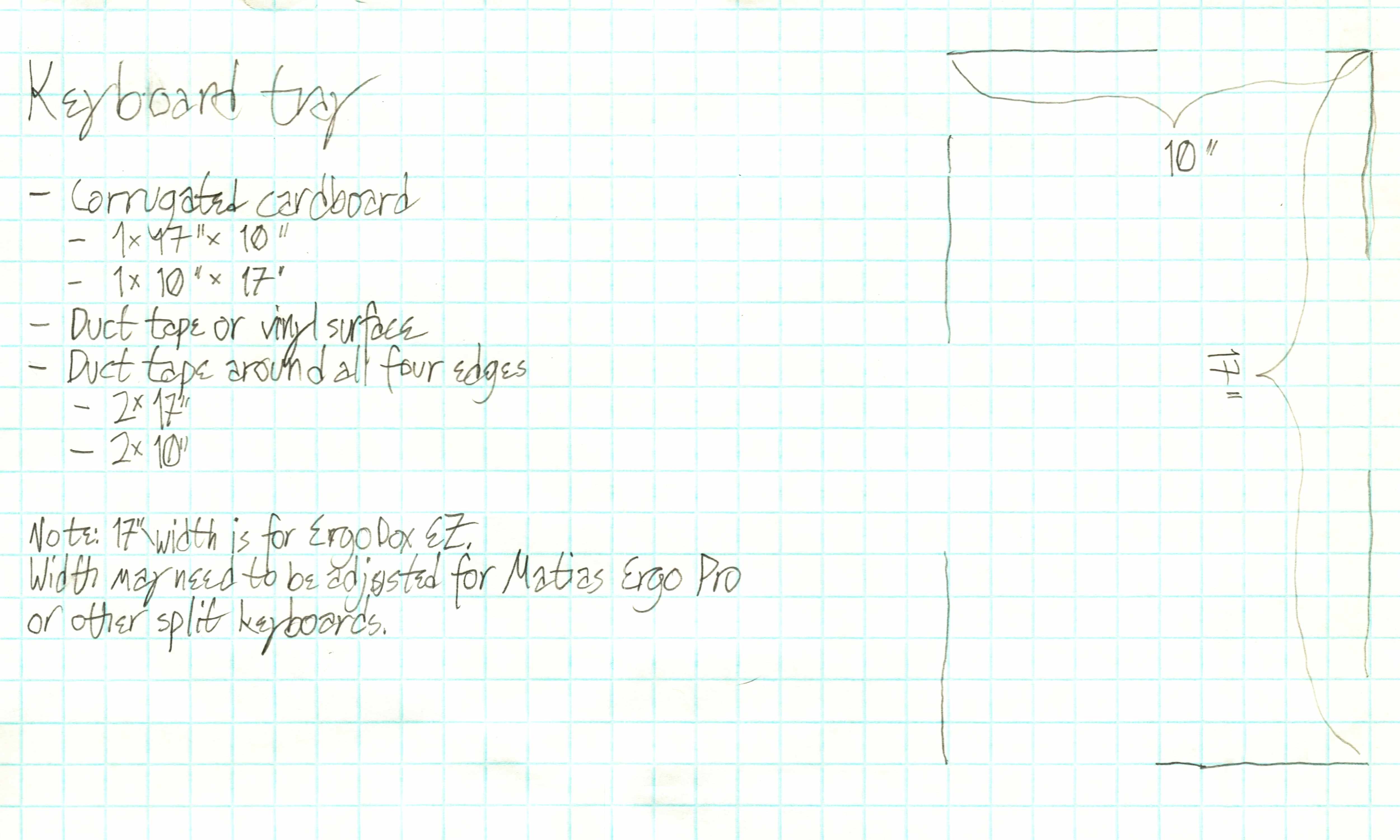
So I made a new one—poetically enough, from the box that the commercial lap desk came in. This one is 17 by 10 inches, and has white duct tape across the upper surface and sealing all four edges.

The structure is simply two sheets of corrugated cardboard, with the corrugations of one sheet perpendicular to those of the other. One sheet is 17 by 10, while the other is 10 by 17. With one rotated 90 degrees and the two taped together into one unit, it becomes a very lightweight but rigid platform, not flexible in either axis because the corrugations along that axis prevent it.

Scan of the measurements on graph paper for the project, along with a bill of materials consisting of two sheets of cardboard (one 17 by 10, the other 10 by 17), plus white duct tape or vinyl for the surface and duct tape for the edges.

As I noted in the diagram, 17 inches is a width that works for the ErgoDox (and my separation distance), but might not work for the wider Matias Ergo Pro. The remedy for that is simple: Use wider/longer cardboard.

Photo of the keyboard tray in use, sitting on my lap, with the ErgoDox keyboard on top of it.

Wordle


2022-01-03 15:06:25 -08:00

Some of you have probably seen some mysterious tweets on Twitter consisting of several rows of yellow, green, and white or black emoji squares (much to the consternation of screen-reader users), sometimes also containing the name “Wordle” and what appears to be a score.

Screenshot of a Wordle tweet, bearing the name “Wordle”, the number 196, the score of 3 out of 6, and three rows of five emoji squares: the first having four black and one green, the second having two green and one yellow, and the third and final being all green.

Wordle is a word puzzle game by Josh Wardle. The game is this:

  • Every day, there is a new five-letter word to guess. The word changes every day at midnight.
  • You have six tries to figure out what the word is.
  • In each of your guesses, the game highlights which letters were right but in the wrong place (in yellow) and which were right and in the right place (in green). (There’s also a color-blind mode that changes the color assignments to blue and orange, respectively.)

If you guess the word, the victory screen includes (at least on some browsers; it doesn’t show up on my iPad) a Share button that gives you the spoiler-free emoji representation of how you did.

There have already been two reimplementations that remove the one-word-per-day limit and simply give you a new random word every time you play:

The former also has a slider for word length, so you can try for longer words if you want. The number of guesses doesn’t increase, though.

Tips

If you’re happy with your Wordle game as it is, feel free to skip this section.

Solving word games (including Boggle and similar games) generally starts with the approximate high end of the frequency distribution of letters in English text, “ETAOIN SHRDLU” (or, more freshly but less pronounceably, “ETAOIN SRHLDCU”).

Based on that, my opening gambit in Wordle consists of the following two words:

  1. EARNT
  2. SOLID

The other two implementations don’t recognize EARNT, so my alternate opener is:

  1. LEARN
  2. STOIC

Either of these openers will usually give you at least a couple of letters that are somewhere in the puzzle, and get you started on eliminating the remaining letters of the alphabet. You still have a few other common consonants and a couple of vowels (U and Y) to try before moving on to the less-common letters.

My other tip—really more of a heads-up—is that the game does sometimes use words that contain multiples of a letter, so don’t assume that the fifth letter you’re looking for is one you haven’t already picked—it may be a double letter (e.g., SPOOL) or a letter that appears twice (STAYS).