Gun-jumping Apple Bug Friday! 67
Thursday, August 2nd, 2007This bug is iTunes viewport pinned to top of selection when selection is at top of viewport. It was filed on 2007-08-02 at 10:31 PDT.
This bug is iTunes viewport pinned to top of selection when selection is at top of viewport. It was filed on 2007-08-02 at 10:31 PDT.
They’re calling it “iTunes Plus”, and the current Single-of-the-Week is available in it. Took them long enough—yesterday was the last Tuesday in May, and they didn’t even get done with it until today.
Ah, well. At least it’s finally here. Woo-hoo!
By the way, you need to update to iTunes 7.2 and agree to the iTS terms and conditions again to turn on iTunes Plus. The actual T&C haven’t changed, but the Terms of Sale have.
This bug is iTunes does not FNNotify after moving items to the Trash. It was filed on 2007-04-13 at 19:56 PDT.
This bug is iTunes should use real combo boxes in its Info dialogs. It was filed on 2007-04-06 at 23:48 PDT.
First, the article.
Holy shit.
Oh shit.
Shit.
5G iPod users, listen up: Apple is offering a demo of its Vortex game.
In MacBreak episode 56, Merlin Mann talks to (among other people) Dan Moren of MacUser, who I think inadvertently states the reason why Apple has not released an SDK for the iPhone. From 1m25s:
Merlin Mann: And what I wanna know from you is, if you had a software development kit today, and you could walk home and, I don’t know, go learn Xcode, and make the application of your choice, what would you put on an iPhone?
Dan Moren: I think that the most compelling thing is to take on Cisco with their iPhone, with the VoIP capabilities? I mean, I’d like to see some Skype on the iPhone. If you got the WiFi in there, you got some, you know, 3G or something, but for those of us who don’t wanna switch to Cingular, you know, and you still want some voice capabilities, why not be able to develop a Skype, put in some voice communication application in there, … it’d be great to have some kind of AIM functionality too.
I think that’s it. The iPhone is closed because if it wasn’t, you’d be able to use the iPhone without continually paying for Cingular phone calls or SMS (by using Skype and $IM_SERVICE instead).
That means that if they do make an SDK, it won’t be available until at least two years from June.
This is a response to Daniel Jalkut‘s iTunes Script: Recent Podcasts.
It is possible to do what he does with scripts with smart playlists. The result requires no user action to update, since the playlists will update automatically. You can even use them to sync recent podcasts to your iPod.
We start with a playlist for all podcasts:
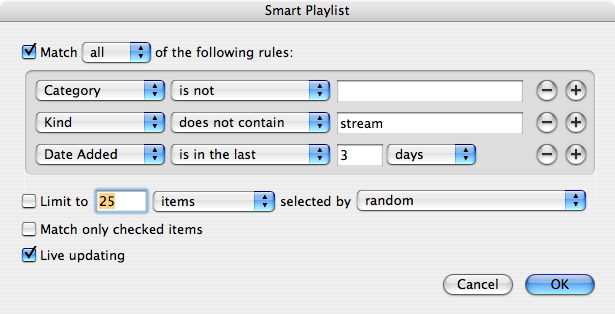
This smart playlist provides the same function as the script with its kIgnoreAlreadyPlayedPodcasts property set to its default value of false. If you like kIgnoreAlreadyPlayedPodcasts set to true:
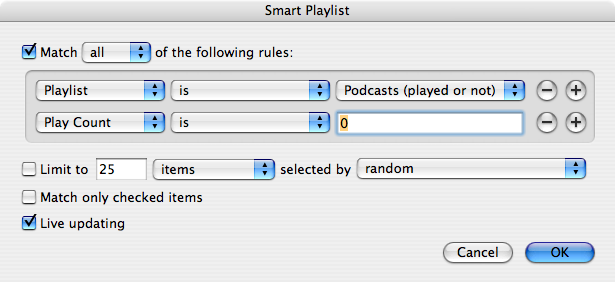
This playlist derives from the first one, and you can replace the Playlist rule with the three rules of the other playlist if you don’t want a played-or-not playlist hanging around.
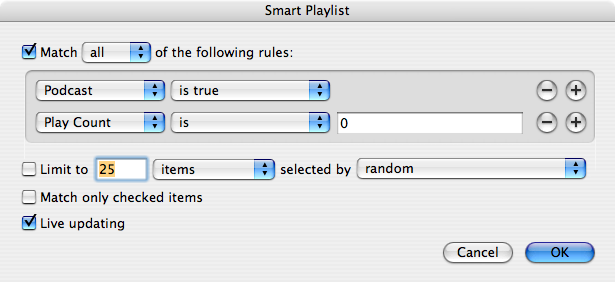
UPDATE 2007-01-08: Daniel Jalkut pointed out that there’s a Podcast criterion that I could have used. I completely missed it. This makes the solution much simpler:
PBS is looking at three science-show pilots, and can’t decide which one to order as a full series. So they’ve made all three pilots available, for free, and ask your opinions on them (perhaps by iTunes commenting — I haven’t watched the videos; there may be instructions within them or something). Each show is a full hour. They are:
The Areas of My Expertise by John Hodgman (aka a PC, aka The Daily Show’s resident expert), read by the author. All six hours, 58 minutes of it. Free.
While flipping through Michael McCracken’s blog, I found his blog post about his instant replay in QuickTime Player script, and decided that that would be a good thing to have in iTunes (especially when I want to quote some George Carlin to somebody).
So here it is. It’s in source-code-only format; you should probably compile it using Script Editor before using it. It uses iTunes’ own rewind function, which will jump back four seconds; play with the “delay 0.1” line if you want to jump back farther. I bound it to ctrl-⌘-⇠ using Quicksilver‘s Triggers feature.
The iTunes Store has a new feature as of today called the Million Hit Lowdown. They have the season finales of Lost, Desperate Housewives, and Grey’s Anatomy, as well as a documentary special relating to each show, available for free. All told, about six hours of video. The catch is, each season finale will only be free until it has been downloaded one million times. So if you want any of these, you should snap ’em up before they go away. (You can always pause the download if you don’t want to download it immediately.)
If you want all the episodes in one list, here’s an iTunes search for them.
Power Search is finally linked from the front page of every iTMS section. This isn’t a complete fix to iTunes 6’s ruined search field that doesn’t let you select a criterion before searching (I haven’t tried 7 yet), but it’s nice to have anyway. I will definitely make a webloc with the itms: URL for it.
The borders and backgrounds on the TV Shows section are nice.
Hooray for movies! Pretty small selection, but the TV Shows section started out small too. Hopefully some other studios will get on board with the idea of selling their movies through iTunes.
I like the new top-level pane for an iPod.
They finally added a downloads viewer! Woo-hoo!
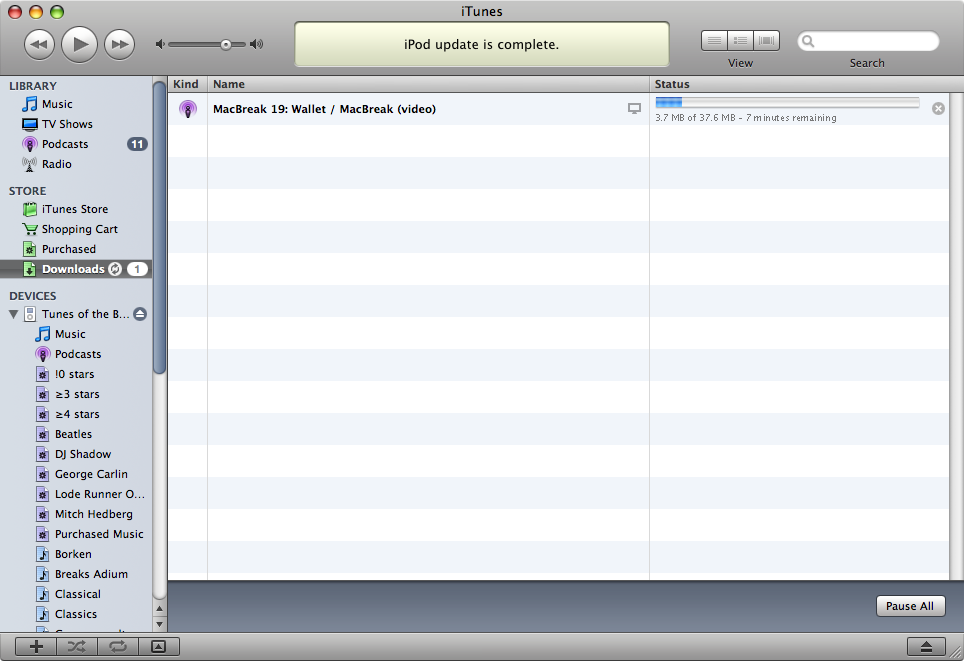
Speaking of which, iTunes now downloads up to three of your pending downloads (e.g. season pass episodes) at once. This also applies to shopping-cart downloads. There’s no obvious pref to change the maximum number of concurrent downloads.
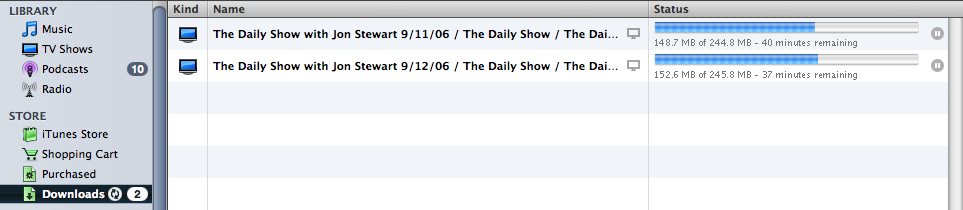
You can pause a download and resume it later. IMO, this is a necessary feature, especially with the huge new 640×480 downloads. As an example, this Lost episode is only 920.4 MB, according to iTunes’ downloads viewer.
You can now get album art from iTMS for songs that don’t have any (because you ripped them from CDs, downloaded them from eMusic, recorded them from TV or radio, etc.).
I’m going to say this in font-size: 120% because it’s just so huge. THEY FIXED VIDEO FRAME-RATES IN iTUNES! I can now play MacBreak (which is HD) at half-size with an acceptable frame-rate and The Daily Show (in the old 320×240 size) at double-size with a smooth frame-rate!
SHOUTING IS BAD!
Helvetica is ugly. What was wrong with Lucida Grande? Can we now expect a return to Helvetica in Leopard? (Strangely, this only applies to iTMS. iTunes itself still uses Lucida Grande.)
They got rid of the “Free Downloads” sections on the Music and TV Shows pages. Why? I liked knowing at a glance what I could get for free. There isn’t even any indication on the iTMS front page that there’s still a Discovery Download (and there is, as you’ll find if you search for it).
UPDATE 2006-09-19: Simone found that if you turn off “Just for You”, a “Free Downloads” section appears on the front page of iTMS. If you then click “See All” in that section, it takes you to this page. Unfortunately, the list there is incomplete; it, too, is missing the Discovery Download.
Some of the heading borders look like a rather plain web page — just a basic border around some text (consider this example). The old headings looked much better.
Another new version of QuickTime? What exactly is wrong with the one I have?
Some pages have hyperlinks, but they aren’t underlined. When I see a hyperlink like this one, my first thought is “how?”.

$5 a game? Do cell-phone people pay these prices?
Could they have made the new UI any uglier and more non-standard?
It does not respect Appearance preferences. I already chose a selection color and turned on double-arrows-at-both-ends. iTunes uses neither of these. (UPDATE 2006-09-20: Simone has filed both of these as bugs.) And its scroll thumbs (which look almost, but not quite, like Dashboard’s) are some funky cross between Aqua and Graphite. Pick one!
The outline view, scroll bars, column video headers, buttons, checkboxes, radio buttons, and iPod tabs look nothing like any other app. (Only in the main window, though; not the preferences.)
iTunes is paranoid about showing dialog boxes for perfectly harmless and easily reversible actions.
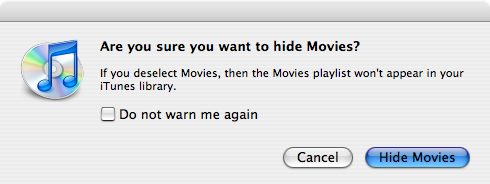
Yes! Of course I do! That’s why I unchecked the checkbox! And if I didn’t, I could simply check it again!
STILL with the UI preemption! Please, Apple, let us do two things at once! (I’m referring now to the “Updating library…” dialog, as well as to the old “Buffering stream…” dialog that appears when you listen to a preview or when a stream lags. These operations cannot be canceled or postponed or backgrounded, except that you can switch out of iTunes and use some other app while it churns.) UPDATE 2006-09-20: Also filed as a bug by Simone.
The new “Cover Browser” (which I think is what used to be called CoverFlow) is nice. But it only works in the Library, not on iPods. Why?
No more Browse view. I miss this because it was a much faster way to navigate the TV shows.
UPDATE 2006-09-14 23:47 PDT: Not so! m2e points out in a comment that the Browse view is still around; simply press ⌘B. You can also choose “Show Browser” from the View menu. Thanks!
UPDATE 2006-09-20 00:31 PDT: Also, klarno points out in a comment that you can invoke it by clicking the eye button at the bottom-right of the window. That’s how I used to invoke it: by clicking the eye button. But in 6, that button was in the top-right, and was colored, and had the word “Browse” under it. I thought that the new one invoked the Visualizer (which would have been welcome; an eye makes much more sense to me as a symbol for “Visualize” than for “Browse”).
iTunes takes 20% CPU (40% if the downloads viewer is visible) to download something. This is worse even than Safari or OmniWeb.
The icon’s beamed eighth note (♫) is blue again.


The new rewind/playpause/fast-forward buttons are nice.
The chasing arrows are back!

The iTunes Music Store is now the iTunes Store.
You now only get the jump-to-iTunes-Store buttons for the selected item in a list of songs, not all of them. Slightly distracting to see buttons appear and disappear as the selection changes. But I don’t think they were clickable for non-selected items anyway, so it doesn’t matter much.
I don’t like the new interface, but I can tolerate it in exchange for the greatly improved video performance, the higher resolution, and the concurrent and resumable downloads. On the whole, I like the new iTunes.
Oh, and the new iPods look awesome. The new shuffle redefines the nano’s old slogan, “impossibly small”, and the new nano brings back the great (and non-scratch-prone) aesthetics of the iPod mini. Good work, Apple iPod division!
One of the most frequent complaints about the iTunes Video Store is the resolution. All videos are 320×240.
The reason why lies on Apple’s iPod specifications page:
Display
- 2.5 inch (diagonal) QVGA transflective, over 65,000-color liquid crystal display with white LED backlight
- 320 x 240 pixel resolution, .156-mm dot pitch
Let’s say that iTVS sold shows in their native resolution. Joe User buys a show that comes in 720p HD (a 16:9 resolution). He transfers this to his iPod, and watches it on the train. What does he say as soon as the title screen comes on?
“Wow, this sucks. They cut off the top and bottom of the video. I won’t be buying any more TV shows from iTunes again.”
What happened?
Well, remember that the iPod’s screen has a 4:3 aspect ratio. If you show all of a 16:9 video frame on it, you have empty vertical space — usually manifest as black matte above and below the frame, called “letterboxing” (because it’s like looking through a mail slot). Joe User has a screen of a certain height, and the video is not filling that height, so he assumes that the video has been cut.
The other solution is to cut off part of the frame, so that the height is filled, at the expense of the left and/or right end(s) of the frame (called “pan and scan” because the crop must be moved back and forth to keep the important part in-frame). This, in fact, is what Apple does: the videos you buy from Apple have been pre-cut to fit the iPod’s screen. Joe User is happy, even though he is in fact seeing fewer pixels than before.
Aspect ratio isn’t the only issue; there’s also the sheer number of pixels to put on the screen. You can’t fit all of a 720-line-high frame onto a 240-line-high screen, unless you scale it. That takes CPU power, which in turn uses up battery life and may reduce the framerate. Apple does that heavy lifting in advance, so that your iPod doesn’t have to.
There’s a third solution: Make the iPod’s LCD widescreen. This means doing one of two things to it:
The problem with both solutions is that they make it harder to browse music. Vertical space counts here (for scrolling menus); horizontal space is not as important. And the iPod is still a music player first.
I think that Steve Jobs looked at all of this and decided that the iPod Video as implemented is the best way he could come up with. And if so, I agree.
Technorati tags: iTunes, iPod, iTMS, iTVS, iTunes Music Store, iTunes Video Store.
Just the one: an Apprentice highlight reel.
Technorati tags: iTunes, iTunes Music Store, iTMS, iTunes Video Store.
You can now buy season 4 and season 5 from iTVS. Good to see.
Technorati tags: iTunes, iTunes Music Store, iTMS, iTunes Video Store.
This bug is iTVS Browse view is way out of date. It was filed on 2006-04-14 at 23:01 PDT.
UPDATE 2006-05-02, 16:59: I just checked, and the Browse view now contains all of these shows and most of these seasons. I’ll update the bug (and this post) later with the missing seasons.
The Browse view for the TV Shows section of the iTunes Music Store is missing many shows and seasons of shows.
99 shows are listed.
70 shows are listed.
None known.
A previous bug, “The Daily Show and The Colbert Report not listed among iTunes TV Shows”, which has since been fixed, has the same nature. Perhaps a system needs to be constructed that automatically updates the contents of the Browse view when new shows or seasons are posted?
The full list of missing shows and seasons is:
I might linkify those here at some point.
Technorati tags: Apple Bug Friday, applebugfriday.
This bug is Left/right arrows do not move back and forth in Browse view. It was filed on 2006-04-14 at 22:22 PDT.
Pressing the left or right arrow key does not move among the columns in iTunes’ browse view.
The focus moves to a different column.
iTunes switches to the previous or next track instead.
None known.
iTunes seems to forward the arrow keys to Previous and Next Track, regardless of focus. Having the Browse view focused should override this, for consistency with other column views (like in Finder or NSSavePanel).
Technorati tags: Apple Bug Friday, applebugfriday.
While I was working on a bug report against iTVS, I found this: CSTV 101, commercials for CSTV.
Technorati tags: iTunes, iTunes Music Store, iTMS, iTunes Video Store, iTVS, CSTV.
This bug is Disjoint selections don’t drop where you tell them to. It was filed on 2006-04-07 at 03:28 PDT.
When you drop a disjoint multiple selection of songs into a position in a playlist, they will land in the position above the song that you dropped them below.
The songs land between A and B.
The songs land at the top, above A.
All versions 6 and later have this bug. I don’t know if any previous versions have it.
Contiguous and single selections are not affected. Dragging a contiguous or single selection in step 3 above will land the song or songs between A and B, as expected.
The direction of the drag (up or down) does not matter. The bug will happen either way.
Drag and drop songs one contiguous bunch at a time, or drop them below song B instead of above it.
Technorati tags: Apple Bug Friday, applebugfriday